

Tattoo Models

A4 Thermal-copier

A3 Thermal-copier


Stencil Paper

Tattoo Stencil paper

 
Carriers

Teflon

Hi-resolution Budget


Spare Parts

All models


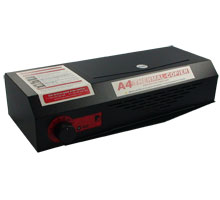
A4 Thermal-Copier
A4 Thermal-Copier

Product Code: TCA4-TM

Previous models have been called Thermo copiers, Thermo Fax, Therma Fax, Fordifax, GBC Fordi Fax and the VistaFax model.

Developed from the current A3 model’s components and imaging technology, the A4 model is a lighter, more compact system designed for heavy duty school use. German engineered and built, the A4 machine is strong using a one piece metal housing, yet remains lightweight at only 5.8Kg for easy storage.

The electronic speed controlled operation uses a direct drive motor to eliminate all the gears, wheels, cogs, drive cones, belts and components that required replacement in previous Thermal-Copier models [i.e. VistaFax & 3M].

Why buy from us?

Great thing about the Internet is that it lets you check many prices before you order, however there are other factors you must consider before buying.

US models are 110volt with a 110volt element, fuse, etc.
You WILL have to buy a professional grade power transformer or the fuse blows instantly and there's a risk to the heat lamp.

Airfreight, Duty & GST must be added
US prices do not include import Duty and Taxes. At a pack weight of 13.5Kg Australian Customs will stop the parcel and charge you. Even if it's sent as a gift or 2nd hand item.

NEHOC give you a full 12 month warranty
If anything goes wrong you will have to freight the machine back to the US supplier for servicing & repairs. So buying from the US may seem cheaper, but convert the costs to Aussie dollars, add air freight, add duty, add GST and add any servicing costs and the lower US price is suddenly much more expensive.

Ultimately it's up to you - we just want you to know there's more to it than just looking at a price.

Machine Specifications

Thermal-Copier Imaging Technology Makes A5 size Makes A4 size Maximum A4 print size Maxiumum 210mm image width

  • Product Home
  • Specifications
  • Accessories
  • Support

Key Features


210mm wide imaging area with oversize imaging available

Direct drive motor - no cogs, gears or drive cones!

Dual cooling fans

Electronic speed control for smooth operation

No belt’s or replacement parts required

Feed button & wide lid opening for easy cleaning


Usage

An approved carrier must be used at all times with the machine to avoid jamming.

Download IS40


Cleaning

Open lid and press feed button to start Glass Roller rotation.

Using Alcohol wipes (Isocol) wipe Glass Roller to clean as required.

Repeat often to ensure Glass Roller is kept clean and free of marks which may cause poor images.

Do not use solvents, turpentine or chemical cleaners.

Contents


A4 Thermal-Copier Machine - 220/240volt

Australian Power Cord

A4 Hi-Resolution Carrier (R-TCA4)

Unpacking and Set-up Guide

A4 Operation Manual - colour paper copy

Sample imaged screen suggesting imaging setting for RISO ScreenMaster

Warranty Form


Specifications

Case: Powder-coated Metal

Machine Colour: Black

Microprocessor controlled: Yes

Nominal voltage: 230 V~ 50 Hz

Nominal current: 11.8 A

Power consumption (max.): 1350 W

Fuse: Pushmatic Circuit Breaker: 20 A

Height: 110 mm

Depth: 180 mm

Width: 450 mm

Weight: 6.9 kg

Max. width of artwork: 210mm

Max. width of carrier: 215mm

Temperature signals: None

Cooling: Dual fans only

Manual Feed Switch: Yes

Instructions: Printed Colour Manual

Exposed sample: Yes (RISO ScreenMaster)

Safety CE Certification: Yes

Automatic overheat protection: Yes

Dual temp. sensors: No

Rotation control sensors: No

Power-cord incl. grounding: Yes

Manufacture Warranty: 1 Year*


* 30 Days initial warranty with additional 11 month warranty upgrade upon validation of machines warranty = 1 Year.


Price and Availability

All prices are online in NEHOCdirect - select the 'Just Looking' option in Step 2.


Ask a Question

Complete the Product Assistance Form for a quick reply to any question not answered in the FAQ's or training section - click here . . Select the product code listed at the top of this page.

FAQ's


Can the ScreenMaster mesh be re-used after a design has been imaged onto it?

How detailed can the artwork get?

Once a screen is created, how many prints will I get before the quality lessens?

Can I clean the screens and use them again as many times as I want?

Each time I use a mesh stencil  . . . . do I have to clean it with a solution?

How do you recommend we store our screens?


'Can the ScreenMaster mesh be re-used after a design has been imaged onto it? if so, how many times? how do you clean them and/or care for them to get longer use?'
The design can not be taken off the screen and the actual mesh re-used like traditional silk mesh, however the screen can be removed from the frame, stored and re-used later.
This gives you the added benefit over traditional silk in that your costs for creating the screen are not then wasted if you have to reuse the screen for a different design.

Screens are cleaned in cold tap water and then dry naturally. You can store them on the frame, off the frame rolled up or off the frame stored flat (in a manila folder is recommended).


How detailed can the artwork get? how does it handle lettering?

ScreenMaster will image 6pt type and 1pt lines, plus half tones. The actual print result is limited onto fabrics by the weave of the fabric, as you will lose part of the design in the weave.
We don't recommend going below 14pt type as it just is too small and no one can read it from any distance - not many people get that up close and personal with your t-shirt.

'Once a screen is created, how many prints will I get before the quality lessens?'

Each screen is designed to last about 1,000 prints, however this will vary upon the surface you are printing.
If you use a rough calico material then you will receive about 700-900 prints.
Print onto a soft cotton or flannel and well over 1,500 should be expected.
 
When the 'quality lessons' it normally means the film on the back of the screen begins to break.
You can also prolong this by using Screen Masking Tape applied to the back of the screen before printing starts.

Using Screen Masking Tape you can increase your prints on rough materials by 20%-50%.


'Can I clean the screens and use them again as many times as I want?'

Yes screens are easily cleaned and stored for later use. You can either leave the screen on the frame or take it off and reuse the frame, storing the screen in a folder [or in a tube]. This means if you only print 200, you can store it and print another 200 next week/ month/ year.

Screens will store indefinitely as long as they are stored correctly - away from heat.


Another enquiry is cleaning solutions. I've never screen printed before. So each time I use a mesh stencil and set it up for a new shirt, do I have to clean it with a solution? If so is the solution environmentally friendly...as in if I'm in a hurry can I just toss it out my garage window into the garden without frying plants and flowers?

No, no, no - we don't touch ANY solvents or chemicals with this process, in either making the screen or cleaning.

The ScreenMaster mesh is supplied with the thermal film already coated on the back of the screen.
When we image the screen we burn away the film to expose the design.

When we have finished with the screen you can not get rid of the design, but you can of course clean it and store it for later use.
The advantage we have is you can take the screen on/off the frame so you can reuse the frame for another screen.
Inks are all water based so everything is just washed up in cold water in the sink - no hi-pressure hosing or washouts.

If you are in a hurry you clean the excess ink off the screen and throw the frame into a tub of water [where it can sit for ages] and this will stop the ink from drying in the holes and blocking the screen. If you are in a hurry and don't want the screen again then  of course just bin it.


How do you recommend we store our screens? So far we have kept them all on the frames.

Store on the frame is best for the long term.

If you have to reuse the frame, take the screen off and store it flat in a manila folder along with a copy of your artwork and a sample print [so you know what colour it was printed with]. Store this in a filing cabinet/ box that is away from heat and does not get direct sunlight. This way they are flat and away from heat, but most importantly easily stored/ filed so you can find it again.


Page Information:

< Previous: Tattoo homepage

> Next: A3 Thermal-Copier

Products: TCA4, TCA4-SP, TCA4-TMA4 Thermal-Copier

Last modified: 28 February, 2010
